Description
Smart Exporter — Unity Editor Tool
"From dependency tracking to packaging, one-click smart export."
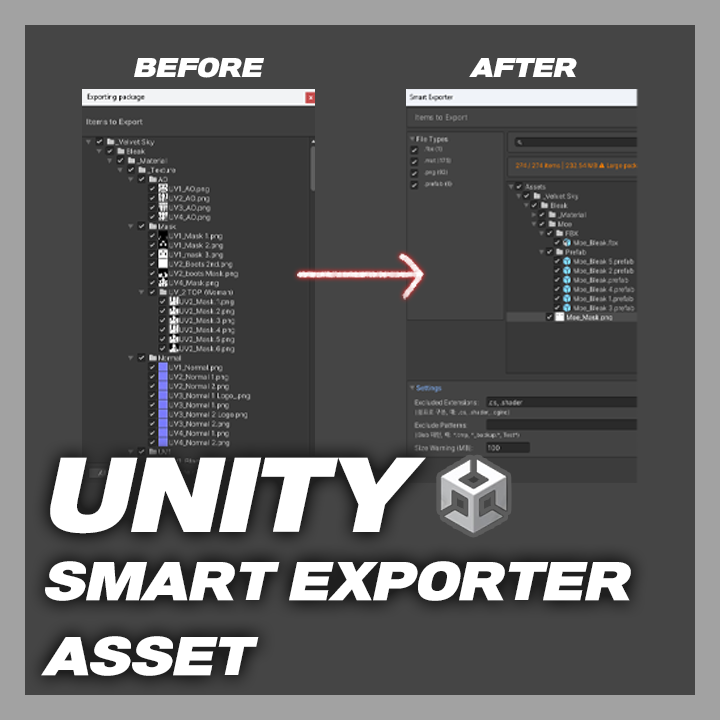
A Unity Editor tool that automatically analyzes asset dependencies, lets you intuitively select files in a tree view, and exports them as a .unitypackage.
◆ Key Features
● Auto dependency collection — Automatically detects all dependencies of selected assets via AssetDatabase
● Folder hierarchy tree view — Per-folder/file checkboxes with mixed state support
● File type filter — Side panel filtering by extension (with file counts)
● Exclusion settings — Extension exclusion (comma-separated, saved in EditorPrefs, default: .cs, .shader) and glob pattern exclusion (wildcard * support)
● Sorting — Sort by name/size/type in ascending or descending order
● Search bar — Quick search by asset name
● Live stats — Displays selected/total file count and size
● Safety checks — Size warning (confirmation dialog when exceeding 100MB), missing dependency warning
● Bulk selection — Select All / Deselect All / Reload List
◆ How to Use
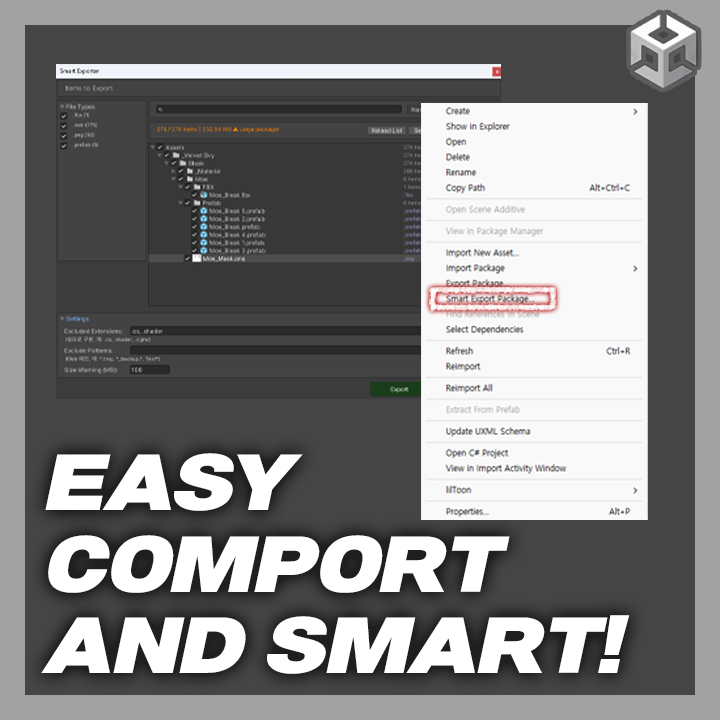
1. Right-click an asset in the Project window.
2. Select "Smart Export Package..." from the context menu.
3. The Smart Exporter window opens and dependencies are collected automatically.
4. Select/deselect files in the tree view; adjust filters and exclusion settings as needed.
5. Review the stats at the bottom, then click the Export button.
6. Choose a save path and the .unitypackage file will be created.
◆ Installation
1. Place the SmartExporter folder under Assets/Editor in your Unity project.
2. Once Unity compiles the scripts, "Smart Export Package..." will appear in the Project window's right-click menu.
◆ License
● This tool is licensed per individual.
● Sharing or redistributing a single license among multiple people is prohibited.
● For enterprise use, please contact us separately.