Description
ShapeKey Animator — Warudo Plugin
"Facial expressions that trigger animations, automatically."
A Warudo plugin that monitors ShapeKey (BlendShape) values in real time and automatically plays designated animations the moment they exceed a set threshold.
Wink to wave, open your mouth to react — create dynamic performances with just your facial expressions.
◆ Key Features
● Threshold-Based Auto Trigger
Automatically plays animations when specified ShapeKey values exceed the threshold.
● Simple & Advanced Modes
Quick-setup Simple Mode for basic use, and Advanced Mode for managing multiple independent groups.
● Hierarchical Animation Fallback
Per-ShapeKey → Group → Default animation priority.
Set a common default animation, then override specific ShapeKeys with their own animations.
● Loop While Active
Repeats the animation while the ShapeKey stays above the threshold.
● Instant Restart on Retrigger
If triggered again during playback, stops the current animation and restarts from the beginning immediately.
● Fine-Tuned Control
Individually adjustable weight, playback speed, and transition time.
● Target Mesh Selection
Monitor only specific SkinnedMeshRenderers.
Leave empty to search across all meshes on the character.
◆ Usage Examples
● Expression (ShapeKey) → Animation
─────────────────────────────────────
● Wink (Blink_L) → Hand wave
● Mouth open (A) → Surprised reaction
● Smile (Joy) → Heart gesture
● Tongue out (Tongue) → Peace pose
◆ Installation
1. Download the .warudo file.
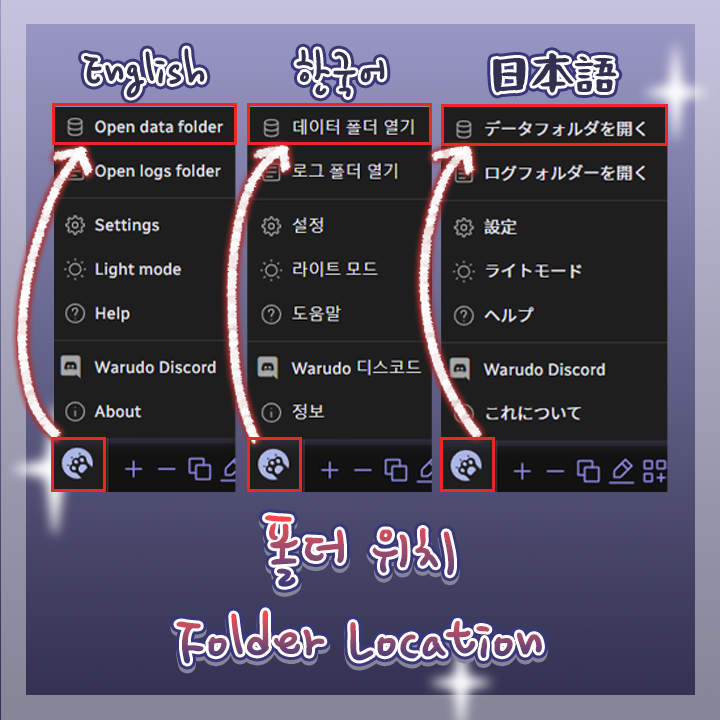
2. Place the file in Warudo data folder → Plugins folder.
3. Restart Warudo.
4. If the "ShapeKey Animator" category appears in the Add Asset list, installation is complete.
◆ Setup
1. In Warudo, Add Asset → "ShapeKey Animator" category → select "ShapeKey Animation Trigger"
2. Assign the target character
3. Select ShapeKey names to monitor (autocomplete supported)
4. Choose the animation to play
5. Adjust threshold, weight, playback speed, etc. as desired
◆ License
● This plugin is licensed per individual user.
● For commission work, both the creator who sets it up and the streamer who uses it must each purchase their own license.
● Sharing a single license between multiple people or redistributing it is prohibited.
● For corporate or business use, please contact us separately.