Description
Hair Color & Bridge 2.0
Recolor all your hair, dye selected strands, or add soft gradient bridge inside Warudo.
Key features
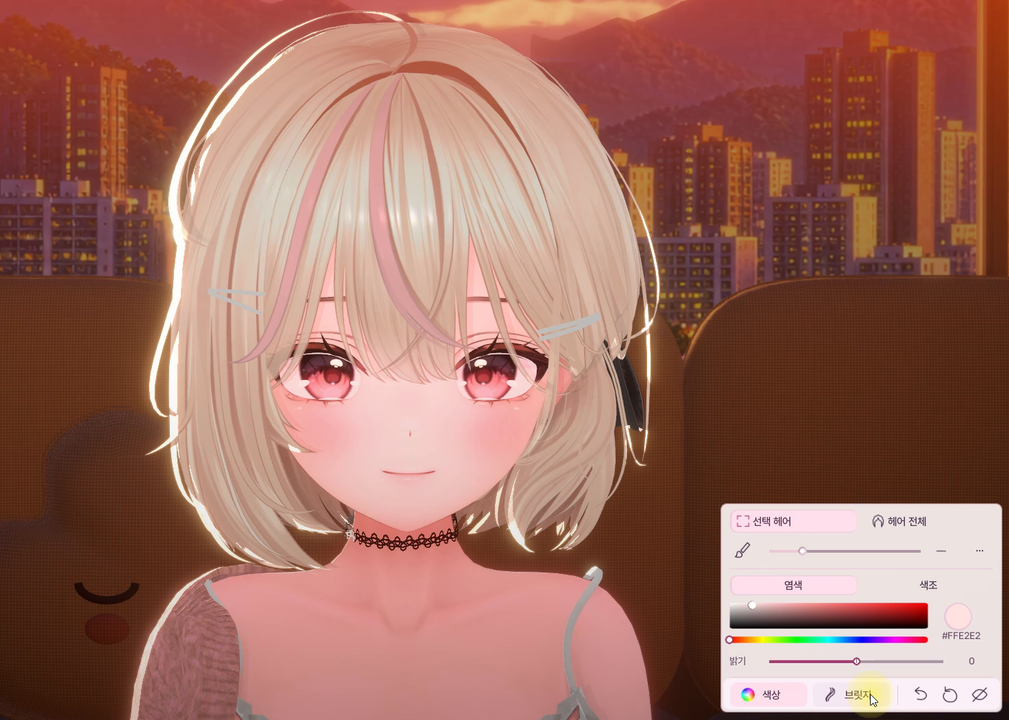
• Click hair to select a part, or recolor the whole hairstyle
• Adjustable brush radius to select nearby strands together
• Dye, hue shift and brightness correction
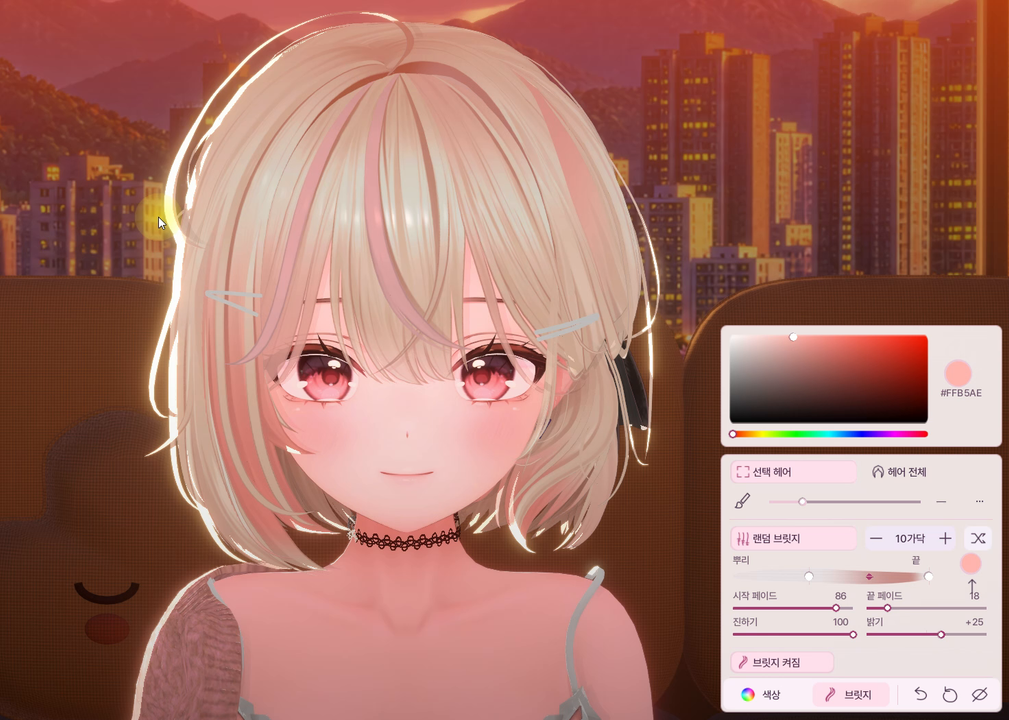
• Bridge position, range, start/end fade, strength and brightness
• Keep the bridge color picker open and click hair to apply the same color
• Random bridge with an adjustable strand count
• Bottom-right UI, undo and reset all settings
Before purchasing
• The source hair mesh must have Read/Write Enabled. In Unity, select the source hair model → Import Settings / Model → enable Read/Write Enabled → Apply, then re-export the character. Already-readable models do not need re-exporting for this setting.
• Selection follows disconnected mesh pieces in the model. It cannot split a continuously connected mesh into arbitrary strands.
• Gradient bridge require UVs and a base texture. Results depend on the model, shader and lighting. Brightness correction cannot recreate missing texture detail.
• Demonstration environment: Windows / Warudo Pro 0.15.1. Version 2.0 has not completed live verification in Standard Warudo.
• Korean UI; Korean, English and Japanese manuals. Hair editing only; outfit recoloring and matcaps are not included.
• Avatar, hair, outfit and environment assets are not included. The main thumbnail is an AI-generated illustration; detail screenshots show actual use in Warudo.
Installation / upgrading from 1.x
1. Back up your scene under a new name. Restore the old Hair Color asset to its original colors, disable it, and save the scene.
2. Close Warudo. Back up Hair Color.warudo outside Plugins. Also remove any development build named Part Studio.warudo from Plugins.
3. Copy Hair Color 2.0.warudo into Warudo/Warudo_Data/StreamingAssets/Plugins, then restart Warudo.
4. Add Asset → Character → Hair Color 2.0, then choose your character.
5. Click hair, adjust Color or Bridge, and save the Warudo scene to keep your result.
1.x settings are not migrated automatically. Configure the new asset again.
Included: plugin, manuals in three languages, terms of use and font license.
Support: messages on the purchased EDEN-WORLD product page.
Terms of use
• One purchaser may use this plugin on their own PCs and avatars, including monetized streams, videos and screenshots.
• File sharing, redistribution, resale, bundling and claiming authorship are prohibited.
• Commissioned setup requires both the operator and end user to purchase a license.
• Contact the seller before corporate or multi-user organizational use.
• See LICENSE_KO_EN_JA.txt for full terms. Refunds and transactions follow EDEN-WORLD policy and applicable rules.
Avatar: Chocolate rice — Mayo
https://chocolaterice.booth.pm/items/8122803
Avatar not included.