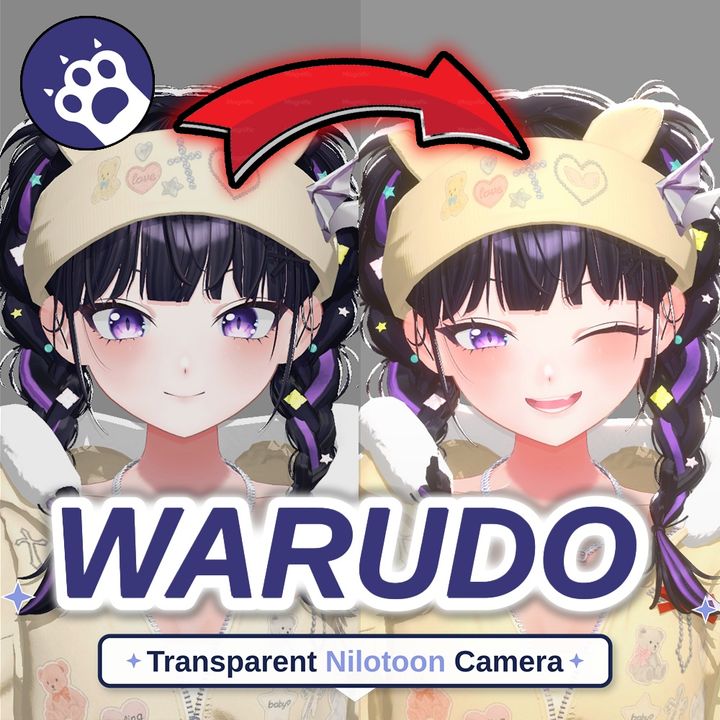
Description
Warudo Transparent NiloToon Camera
Transparent OBS output with lighting and NiloToon effects preserved.
A camera asset for Warudo + NiloToon that preserves the source camera's lighting, volumes and post-processing while sending alpha-enabled Spout output to OBS.
Key features
• Follow a selected Warudo Source Camera
• Toggle NiloToon Volumes and Post Processing separately
• Transparent Spout output for OBS
• Balanced / Clean Outline / Fine Hair / Manual mask presets for hairlines and avatar edges
• Save transparent screenshots
Quick setup
1. Place Transparent Nilo Camera.warudo in Warudo_Data/StreamingAssets/Plugins and restart Warudo.
2. Add a Transparent Nilo Camera asset and assign your existing Warudo camera as Source Camera.
3. Enable Spout Output on this asset. Disable the source camera's own Spout output.
4. Add a Spout2 source in OBS and choose this camera's sender.
5. Use an alpha-aware composite mode rather than Opaque.
Before purchasing
• Requires a Warudo + NiloToon environment and Spout2 reception in OBS.
• Edge adjustments may be necessary depending on the avatar's hair and transparent materials. Backgrounds may show through transparent materials.
• Korean and English installation, preset and troubleshooting manuals are included.
Independently developed using Unity/Warudo SDK standards.
Usage terms
• One purchase per user. Unauthorized distribution, sharing, copying and resale are prohibited.
• For bug reports and support, use messages on the purchased EDEN-WORLD item.
• Refunds and transactions follow EDEN-WORLD policy and applicable rules.
• Warudo, NiloToon, OBS and the avatars/backgrounds shown in demonstrations are not included.